
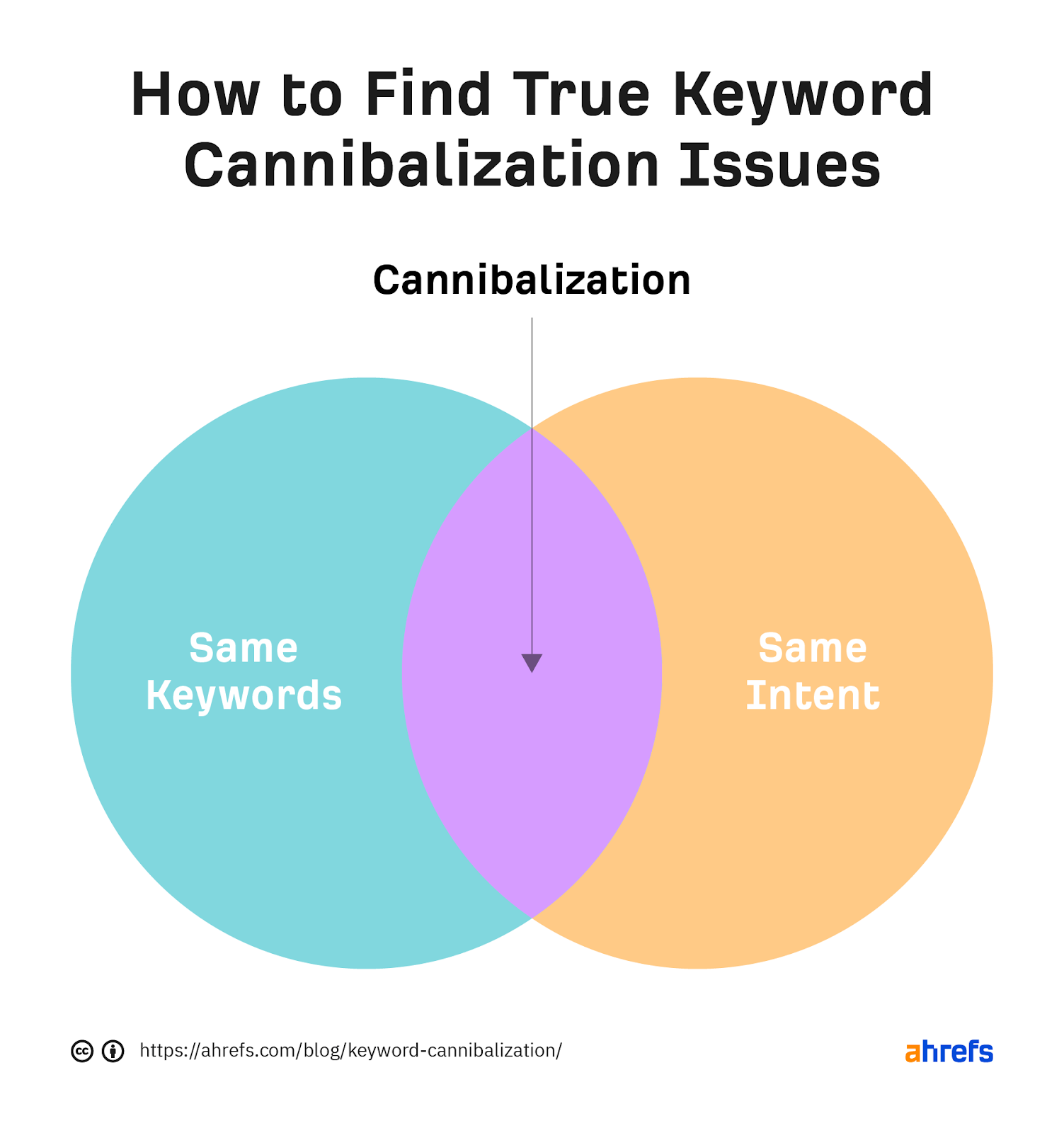
Keyword cannibalization is an SEO problem where two or more pages on the same website target the same keyword and the same search intent, causing them to compete against each other for rankings. This splits link authority, confuses Google about which page to rank, and typically drops both pages lower than a single consolidated page would rank. The fix: merge pages, apply a 301 redirect from the weaker URL to the stronger one, or differentiate by targeting distinct search intents.
What Is Keyword Cannibalization? (Plain English)
Imagine you run a digital marketing agency in Chennai. In 2023 you published a blog post titled "Best SEO Tools for Small Business." Then in 2024, your services page was updated — also targeting "Best SEO Tools." Both pages are now live, both are optimised for the same keyword, and both are fighting for the same position in Google's results.
Instead of Google picking one clear winner and ranking it at position #1, it now sees two pages fighting for the same trophy. The result? Neither ranks well. You've effectively split your own authority and handed the advantage to a competitor with a single, focused page.
That's keyword cannibalization — and it's far more common than most site owners realise.
Keyword cannibalization occurs when multiple pages on the same website target the same primary keyword and the same search intent, causing them to compete against each other for search engine rankings. This dilutes ranking authority across multiple URLs instead of concentrating it into one strong, authoritative page.
There's one critical nuance most guides miss: targeting the same keyword on multiple pages is not always cannibalization. The key ingredient is shared intent. If two pages target the same keyword but serve genuinely different user goals — one informational, one transactional — they can co-exist and even both rank without hurting each other.
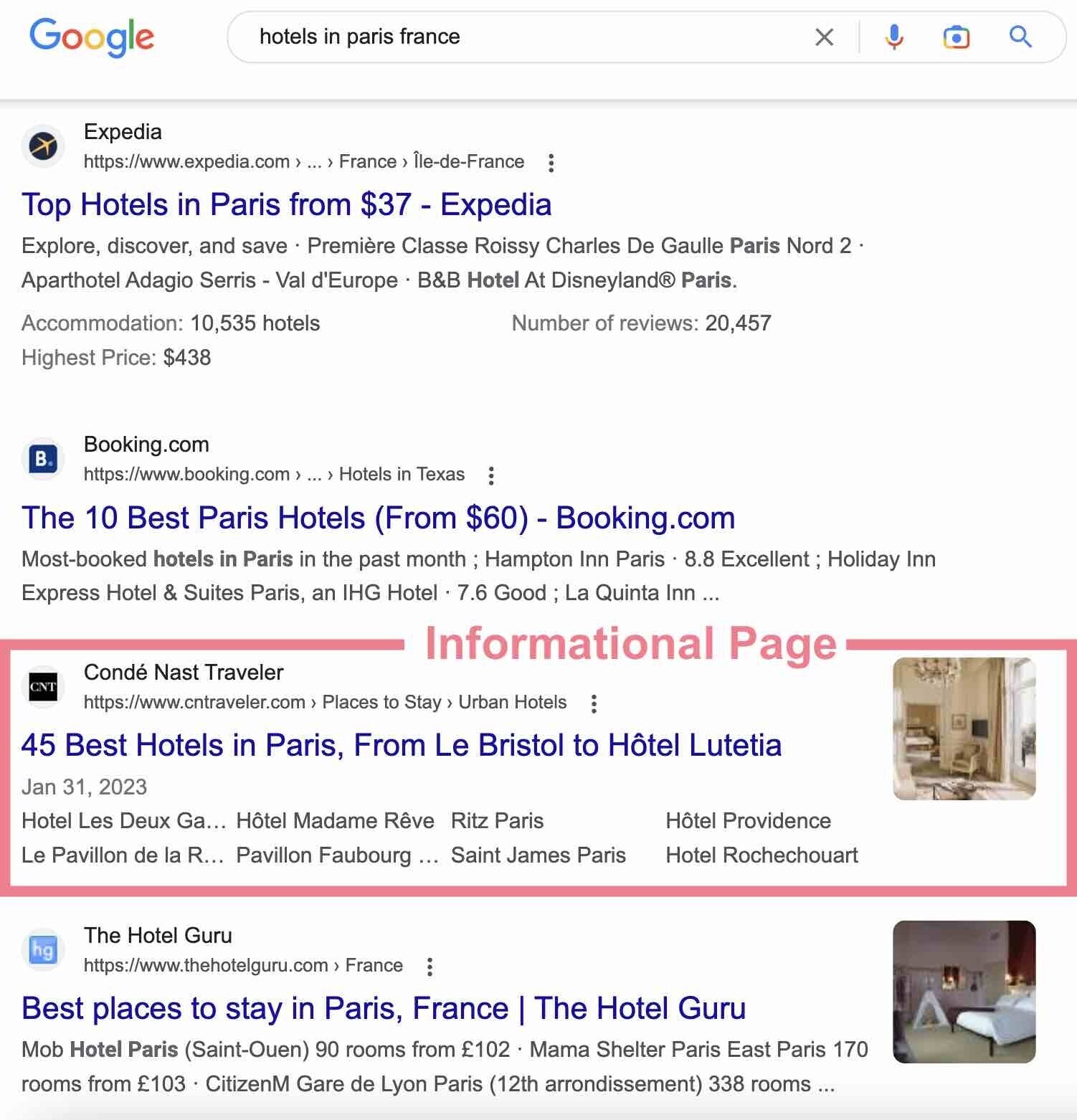
The SERP above shows exactly this. A hotel site could publish both a travel guide and a booking page for "hotels in Paris France" — and both could rank without competing. The problem only begins when two pages serve the exact same user need.
Why Keyword Cannibalization Hurts SEO
The 4 Real Harms — In Plain Terms
1. Split ranking power. Every page earns authority through backlinks, engagement, and internal links. When two pages compete for the same query, that authority divides across both. Instead of one page with 100 authority points, you have two pages with 50 each. The top two Google results earn roughly 3× more clicks than position three — that dilution costs real traffic.
2. Google ranks the wrong page. Your high-converting service page is targeting a keyword, but a thin blog post from three years ago outranks it because it has more backlinks. You're getting impressions for the right keyword but losing them to the wrong URL. This is probably the most expensive form of cannibalization.
3. Ranking volatility. When Google can't decide between two of your pages, it keeps testing them — alternating which one shows up in results. If you've tracked a keyword and watched it bounce between positions 8 and 23 week-to-week without explanation, cannibalization is often the reason.
4. Wasted crawl budget. Search bots spend limited time on your site. Competing pages with the same intent tell bots to process the same content twice — slowing the indexing of your most important, freshest pages. For larger sites, this compounds into a serious technical SEO problem.
Studio 36 Digital's 2026 audit found that 68% of websites rank 5 or more URLs for the same keyword. Keyword cannibalization is one of the most common causes of stagnant organic growth — and most site owners have no idea it's happening.
When Multiple Pages for the Same Keyword Is Fine
Not every case of ranking overlap is a crisis. According to Ahrefs research, pages naturally tend to rank for hundreds of keyword variations. If two pages each rank for very different long-tail terms — even if their primary keyword overlaps — consolidating them might actually reduce your total organic traffic rather than help it.
The one test that matters: Would combining these two pages into one result in more total organic traffic? If yes — fix it. If no — leave it alone and focus elsewhere.
Real-World Examples You'll Recognise
Example 1: The Blog vs. Category Page Conflict
A Chennai e-commerce brand selling running gear has a blog post titled "Best Running Shoes for Beginners" and a category page titled "Beginner Running Shoes." Both target the same keyword and the same buyer intent. The category page is built to convert — but the blog post has more backlinks and keeps outranking it. Result: the page designed to sell doesn't rank; the page that ranks doesn't sell.
Fix: Fold key buying guidance into the category page. Redirect the blog post. All link authority flows to the page that actually drives revenue.
Example 2: The Multi-Year Blog Archive Problem
A SaaS company has blogged for five years. In 2021 they wrote "How to Do Keyword Research." In 2023: "Keyword Research Tips for 2023." In 2025 they updated the 2021 post. Now three pages target the same informational query. Google rotates between all three — none ever breaks above position 11.
Fix: Pick the best-performing URL as the canonical piece. Merge the strongest insights from all three into one definitive guide. 301-redirect the others. Done.
Example 3: Location Pages That Clone Each Other
A service business creates location pages for 15 cities — each with near-identical body text, all targeting "plumber + [city]." The URL structure is correct, but the content is too similar for Google to differentiate. None ranks well for competitive terms.
Fix: Differentiate each page with genuinely unique local content — local team details, city-specific testimonials, area-specific FAQs, local landmark references. Give each page a reason to exist independently.
Before deciding if two pages are cannibalising each other, ask: "If someone searched this keyword, would they be equally happy landing on either page — or do the pages serve clearly different user goals?" If both pages satisfy the same need, you almost certainly have a problem worth fixing.
How to Find Keyword Cannibalization: 3 Reliable Methods
You can't fix what you can't see. These three approaches range from free-and-manual to paid-and-automated — pick based on your site size and toolset.
Method 1: Google Search Console (Free — Always Start Here)
-
Open the Performance Report
Log into GSC, click "Search Results" under Performance. You'll see all queries driving traffic to your site.
-
Filter by a target keyword
Click "+ New" → "Query" → type the keyword you want to investigate. Apply the filter.
-
Switch to the Pages tab
Click "Pages" instead of "Queries." You'll now see every URL on your site receiving impressions for that keyword.
-
Look for multiple URLs with meaningful impressions
If more than one URL has significant impressions, check if they serve the same user intent. If yes — you have cannibalization.
-
Repeat for your top 20–30 keywords
Build a spreadsheet of keywords with multiple competing URLs. This becomes your cannibalization fix list.
Method 2: The site: Operator in Google (Instant Manual Check)
site:yourdomain.com "keyword phrase"
Example: site:clickfused.com "SEO agency Chennai"
If you see two blog posts or two pages with near-identical titles at the top of the results, consolidation is almost always the right move. This also works for competitor research.
Method 3: Dedicated SEO Tools (Best for Larger Sites)
The Cannibalization Report inside Position Tracking flags keywords where multiple URLs compete and visualises when they swap rankings. Best for agencies managing multiple client sites.
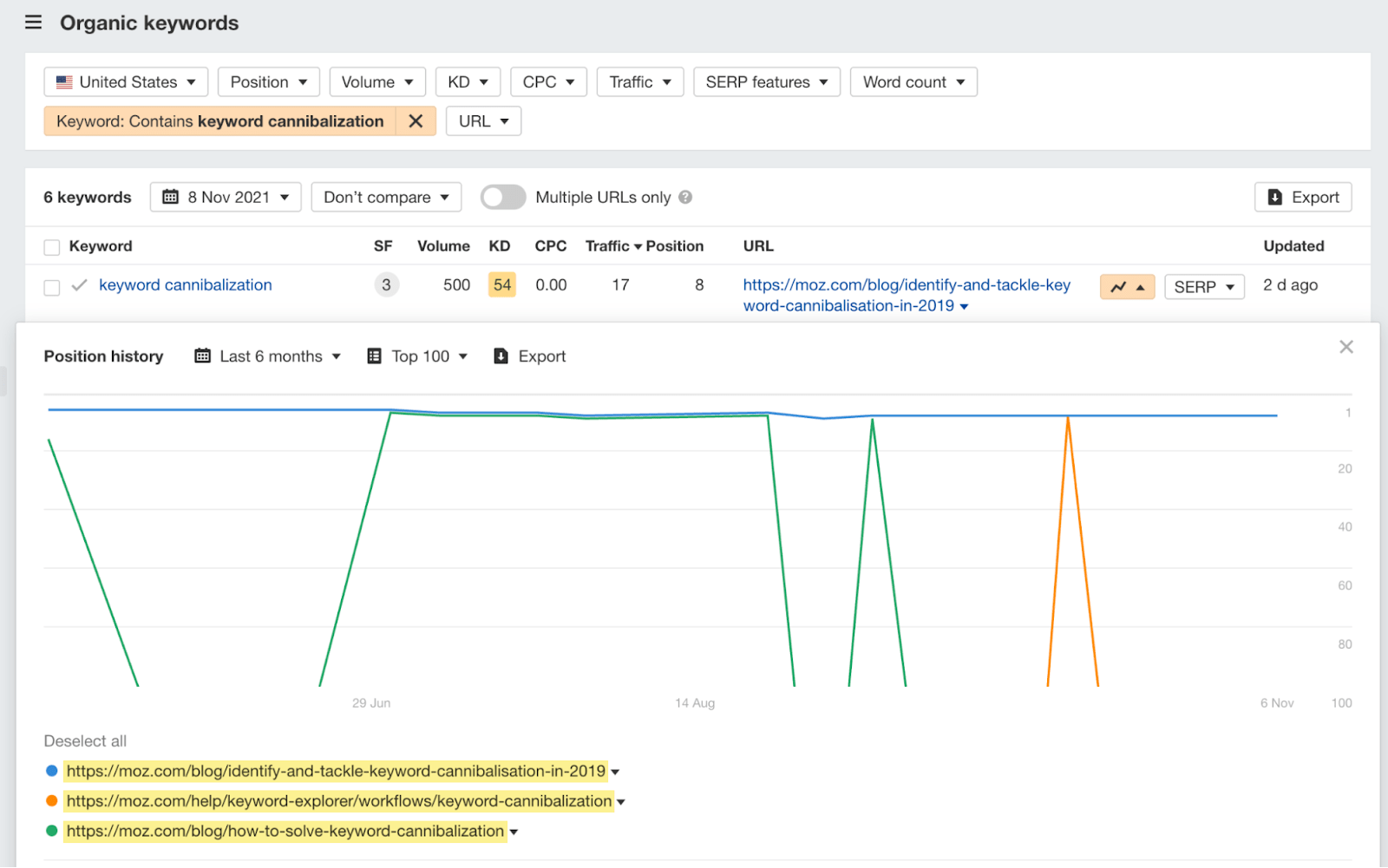
Go to Organic Keywords → filter for a keyword → click Ranking History. See every URL competing for a query over time, with fluctuations clearly shown.
The most trustworthy source — pulls directly from Google's data. Use the Performance → Pages workflow above. Always the right starting point for any cannibalization audit.
Crawl your site, then cross-reference with GSC. Useful for identifying pages with duplicate H1 tags or overlapping title tags at scale across hundreds of URLs.
How to Fix Keyword Cannibalization: 5 Proven Methods
There is no one-size-fits-all fix. The right solution depends on each page's traffic, backlinks, content quality, and intent. Here's the decision framework.
| Fix | When to Use | Passes Link Equity? | Difficulty |
|---|---|---|---|
| 301 Redirect | One page clearly outperforms the other in traffic, backlinks, or conversions | Yes (~90%) | Easy |
| Content Merge | Both pages have unique valuable content; neither alone is comprehensive | Yes (with redirect) | Medium |
| Canonical Tag | You need both URLs live (e.g., campaign pages) but want Google to credit one | Partial | Easy |
| Differentiate Intent | Pages can be repositioned to serve genuinely different user needs | N/A — both survive | Medium–Hard |
| Noindex / Delete | Page has zero traffic, zero backlinks, zero reason to exist | No (unless + redirect) | Easy (risky) |
Fix 1: 301 Redirect (Most Common, Most Effective)
A 301 redirect is a permanent signal to Google: "Everything that used to live at URL A now lives at URL B." Applied correctly, it transfers the ranking authority — backlinks, click signals, trust — from the old page to the preferred one. This is the go-to fix when one page is clearly winning.
If you delete the old page without a 301 redirect, you permanently lose all the link equity that page accumulated. A 301 preserves roughly 90% of ranking power from the old URL. Skipping this is one of the most expensive technical SEO mistakes you can make.
Fix 2: Content Merge (Best for Quality-Driven Situations)
Sometimes neither page is clearly superior. One has more backlinks; the other has more comprehensive content. The right move is to combine the best of both into one definitive resource — then redirect the weaker URL to it. More work than a simple redirect, but often produces the best long-term results because the merged page is genuinely better for users.
Fix 3: Canonical Tag (When Both URLs Must Stay Live)
If you need to keep both URLs live — for a campaign page or paginated content — use a canonical tag to tell Google which URL you consider the master version. In the <head> of the non-preferred page, add:
<link rel="canonical" href="https://yourdomain.com/preferred-page/" />
Note: canonical tags are hints, not commands. Google can choose to ignore them. For reliable authority consolidation, a 301 redirect is always stronger.
Fix 4: Differentiate by Search Intent (Keeps Both Pages Alive)
If two pages currently serve the same intent but could serve different intents, reposition rather than delete. Rewrite one page to target a clearly different user goal. For example: if you have two pages for "digital marketing services" — one a blog post and one a services page — reposition the blog post to target informational queries ("How digital marketing works") while the services page targets transactional queries ("Best digital marketing agency in Chennai 2026"). Now both can rank without competing.
Fix 5: Noindex or Delete (Last Resort Only)
If a page has no traffic, no backlinks, no internal links pointing to it, and no useful content — it might simply need to go. Add a noindex meta tag to remove it from Google's index, or delete it with a 301 redirect in place. Use sparingly: many old pages still accumulate occasional backlinks. Deleting without a redirect permanently discards that equity.
Real Case Studies — What Actually Happened After the Fix
The problem: Backlinko had two articles both targeting the same keyword — one on free SEO tools, one on paid SEO tools. Both competed in search results. Neither ranked as well as it should, and the two pages split authority that should have concentrated in one URL.
The fix: After analysing which URL had stronger engagement and click-through signals, they set up a 301 redirect from the underperforming page to the stronger one. No new content was written. The fix was purely technical — one redirect.
The problem: An e-commerce site's editorial blog posts were consistently outranking their own product category pages for high-intent transactional keywords. Users searching with buying intent were landing on blog articles with no purchase path — causing high bounce rates and lost revenue.
The fix: The team identified the intent mismatch, applied noindex tags to suppress informational pages for those transactional queries, and strengthened product pages with better on-page content and internal link structure.
The problem: An agency identified a conflict for the keyword "SaaS SEO Consultant." Their service page competed with their own blog post on the topic. GSC data showed the two pages constantly swapping positions — never breaking the top 5 for either URL.
The fix: Instead of deleting either page, they repositioned. The blog post was pivoted to target pure informational queries about how to choose a consultant. The service page was optimised exclusively for the transactional "hire" intent.
How to Prevent Keyword Cannibalization From Coming Back
Fixing cannibalization is satisfying. Preventing it is smarter. Here's the operational setup that keeps your content architecture clean long-term.
Build a Keyword Map Before You Publish
A keyword map is a simple spreadsheet that assigns one primary keyword and one search intent to each live or planned piece of content. Before any new content is published, the writer checks the map. If the keyword is already claimed by another URL, one of two things happens: the new content targets a different keyword, or the team updates the existing page instead. This single habit prevents the vast majority of cannibalization issues before they start.
Run Quarterly Content Audits
Even with a good keyword map, cannibalization creeps in over time — especially on fast-growing content sites. A quarterly audit using GSC and your SEO tool takes 2–3 hours and keeps your content architecture clean.
- Export your top 50–100 keywords from Google Search Console
- Check for any keyword where more than one URL earns impressions
- Flag pages with overlapping H1 tags or near-identical title tags
- Review pages that haven't generated traffic in 12 months
- Identify category pages competing with blog posts on the same topic
- Update your keyword map to reflect any changes made
Use Topic Clusters — Not Just Keyword Targeting
In 2026, the most resilient content architecture is built around topic clusters: one comprehensive pillar page targeting a broad topic, supported by cluster pages targeting specific subtopics. The pillar covers "SEO Services." Cluster pages cover "Technical SEO Audit," "Local SEO for Small Business," "Link Building Strategy," and so on. Clear scope boundaries prevent overlap and keep your internal linking structure clean.
One of the most common cannibalization patterns we see with local businesses is service pages competing with blog posts for the same "SEO agency Chennai" or "digital marketing Chennai" queries. The fix: ensure your service pages own the transactional intent, and your blog posts target informational or comparison queries. Clear intent separation = no competition between your own pages.
🔑 Key Takeaways — Keyword Cannibalization 2026
- Cannibalization only hurts when two pages share the same keyword AND the same search intent
- 68% of websites rank 5+ URLs for the same keyword — most don't know it's happening
- Use Google Search Console Performance → Pages tab to detect it for free
- A 301 redirect is the most effective fix — it preserves ~90% of link equity from the old page
- Backlinko saw a 466% traffic increase from fixing one issue with a single redirect
- Always differentiate by search intent first — sometimes both pages can survive with repositioning
- Build a keyword map and run quarterly audits to prevent it from recurring
- Topic cluster architecture is the most reliable long-term defense against cannibalization in 2026
Frequently Asked Questions
These are the five questions most commonly asked about keyword cannibalization — written to work as featured snippets and AI answer engine responses.
site:yourdomain.com "your keyword" in Google and look for near-identical titles. Paid tools like Semrush's Cannibalization Report and Ahrefs' historical ranking view automate this for larger sites.
📚 Sources, Evidence & References
- Ahrefs Blog — Keyword Cannibalization: What It (Really) Is & How to Fix It — Joshua Hardwick, reviewed by Patrick Stox. ahrefs.com
- Semrush Blog — Keyword Cannibalization: How to Find, Fix, and Prevent It — Rachel Handley. semrush.com
- Yoast — Keyword and content cannibalization: how to identify and fix it — Edwin Toonen, April 2025. yoast.com
- Backlinko — Keyword Cannibalization: Why Avoid It and How to Fix It — Shreelekha Singh, Feb 2026. Case study: 466% traffic increase. backlinko.com
- Studio 36 Digital — 2026 study: 68% of websites rank 5+ URLs for the same keyword.
- Traficxo — Content Cannibalization in 2026 — Case study: 170% revenue increase. traficxo.com
- Google Search Central — Crawl budget and indexing documentation. developers.google.com
Is Keyword Cannibalization Hurting Your Rankings?
ClickFused's SEO audit identifies every cannibalization issue on your site — with a clear fix priority list. Free for Chennai businesses.
Get Your Free SEO Audit →